


Before you leave home, pack your passport, confirm your hotel reservation, and charge your phone. One phone setting many travelers forget can lead to an alarming bill after the trip.
At Handy Gear, we know that preparing your iPhone for international use—or any smartphone for travel—is just as important as packing your luggage. Just before you leave, take a few minutes to review your travel phone settings. Even if you don’t use your phone to browse the web, one feature can still use mobile data when you’re outside your cell phone company’s coverage area.
The Setting to Check: Data Roaming
Check Data Roaming first when traveling internationally.
If your phone cannot get coverage from your carrier’s mobile network, it can use another carrier’s network. This keeps you connected, but it can also mean extra expenses if your cellphone service does not cover international roaming.
Turn the setting off, and your phone will not use roaming cellular data automatically unless you choose to enable it later.
1. On iPhone
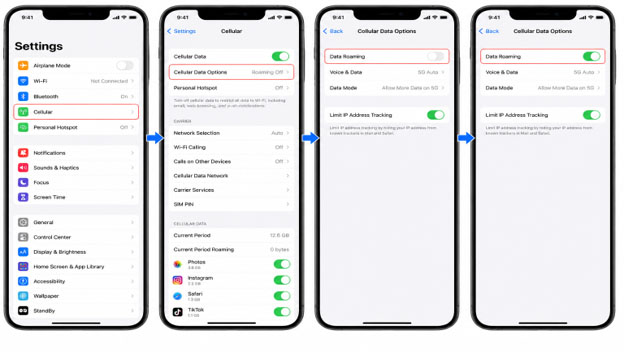
Go to:
Settings → Cellular (or Mobile Service) → Cellular Data Options → Data Roaming
If you don’t plan to use mobile data while abroad, turn Data Roaming off.
2. On Android
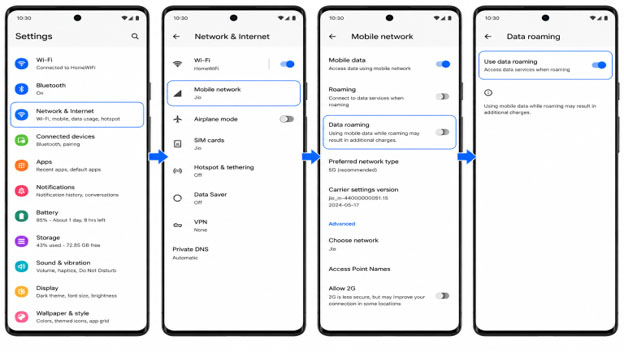
The majority of Android phones follow a similar path:
Settings → Network & Internet (or Connections) → Mobile network → Data Roaming
The menu name may vary by manufacturer, but you can find it on most Android devices.
Consider Public Wi-Fi Carefully
Many travelers use free Wi-Fi at airports, hotels, or cafés to avoid mobile data.
ADVERTISEMENT
Public networks may not be secure. CISA advises caution on public Wi-Fi and recommends avoiding sensitive activities, such as banking or shopping, unless you trust the network or use added security measures, such as a VPN.
Before you travel, check whether your phone automatically connects to saved public networks, and delete any you don’t know or use.
Download What You Need Before You Leave
Don’t rely on roaming data or unknown Wi-Fi when you have a trusted connection to download important information.
Useful items include:
- Offline maps
- Boarding passes
- Hotel reservations
- Translation packs
- Entertainment for your trip
Having these available offline can help reduce the need for constant internet use.
Check Your Carrier Before You Travel
Shutting off data roaming is a good idea, but it may not be essential if you have an international data package with your mobile plan.
Before your flight, check whether your carrier offers:
- International roaming packages
- Daily travel passes
- Countries included in your plan
Understanding coverage will help you avoid unexpected charges while connected.
One Small Setting Can Prevent a Big Surprise
Data roaming can be useful if you plan to use mobile data while traveling internationally. The issue is forgetting that it’s activated.
Review your international travel phone settings before your next trip. In addition to avoiding extra charges, disabling Data Roaming, reviewing saved Wi-Fi networks, and downloading important files before your trip can help ensure your phone is ready before you travel.