

Streaming services, cloud storage plans, fitness applications and premium memberships are all popular with free trials or modest monthly rates. These repeated charges might accumulate over time. Many people are still paying for services they hardly use because they forget they subscribed.
Checking your subscriptions monthly will help you identify unexpected costs, cancel services you don’t need, and keep your spending in check. Check your subscriptions on your iPhone and Android device and uncover neglected auto-renewals.
Why You Should Review Your Subscriptions Regularly
Multiple subscriptions will renew automatically if you do not cancel them. Because of this, it’s simple to miss charges for services you enrolled in months or even years prior.
A regular review of a monthly subscription can help you:
- Determine unused subscriptions
- Identify unexpected price increases
- Find duplicate services
- Don’t pay for forgotten free trials that turned into paid trials
Just going through your subscriptions every few months can have a huge impact!
How to View Your Subscriptions on iPhone
All active and expired subscriptions will be accessible from your Apple ID.
Go to:
Settings → Your name → Subscriptions.
Your Subscriptions will appear as such:
- Active subs
- Expired subs
- Renewal timeline
- Price
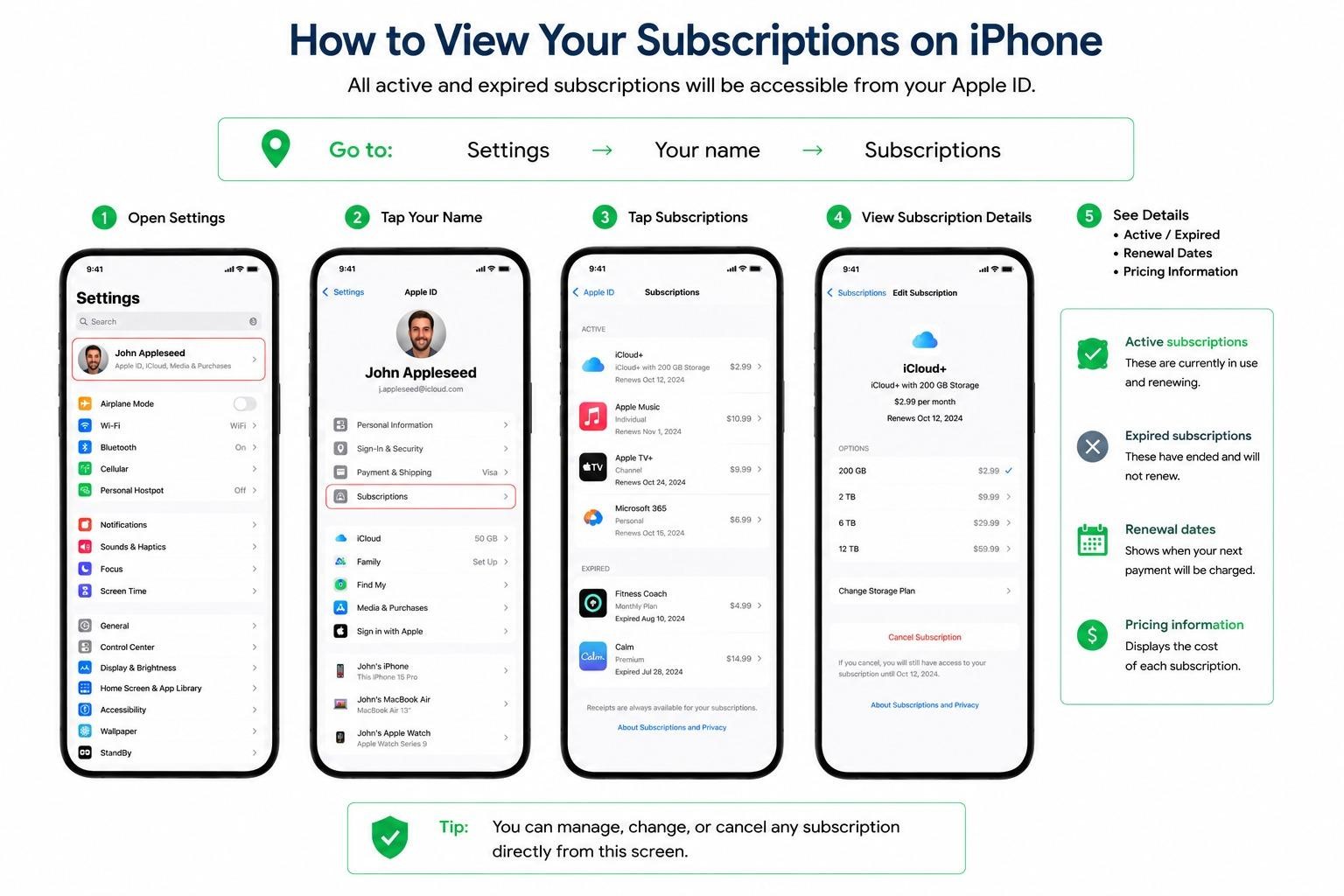
Click on any subscription to view more information, adjust plans, or cancel a subscription.
What to Look For
As you review your monthly subscriptions, ask yourself:
- Have you used this service in the past month? (Yes/No)
- Am I paying for several services that perform the same function?
- Is the subscription up for renewal in the near future?
- Is it still the same price as when I joined?
If the answer to the first question is “no”, it is worth considering to cancel.
How to View Your Subscriptions on Android
Users with Android devices can manage subscriptions they made using Google Play.
Go to:
Google Play Store → Profile Icon → Payments & Subscriptions → Subscriptions
ADVERTISEMENT
Here you can view:
- Active subscriptions
- Renewal dates
- Billing amounts
- Available cancellation options
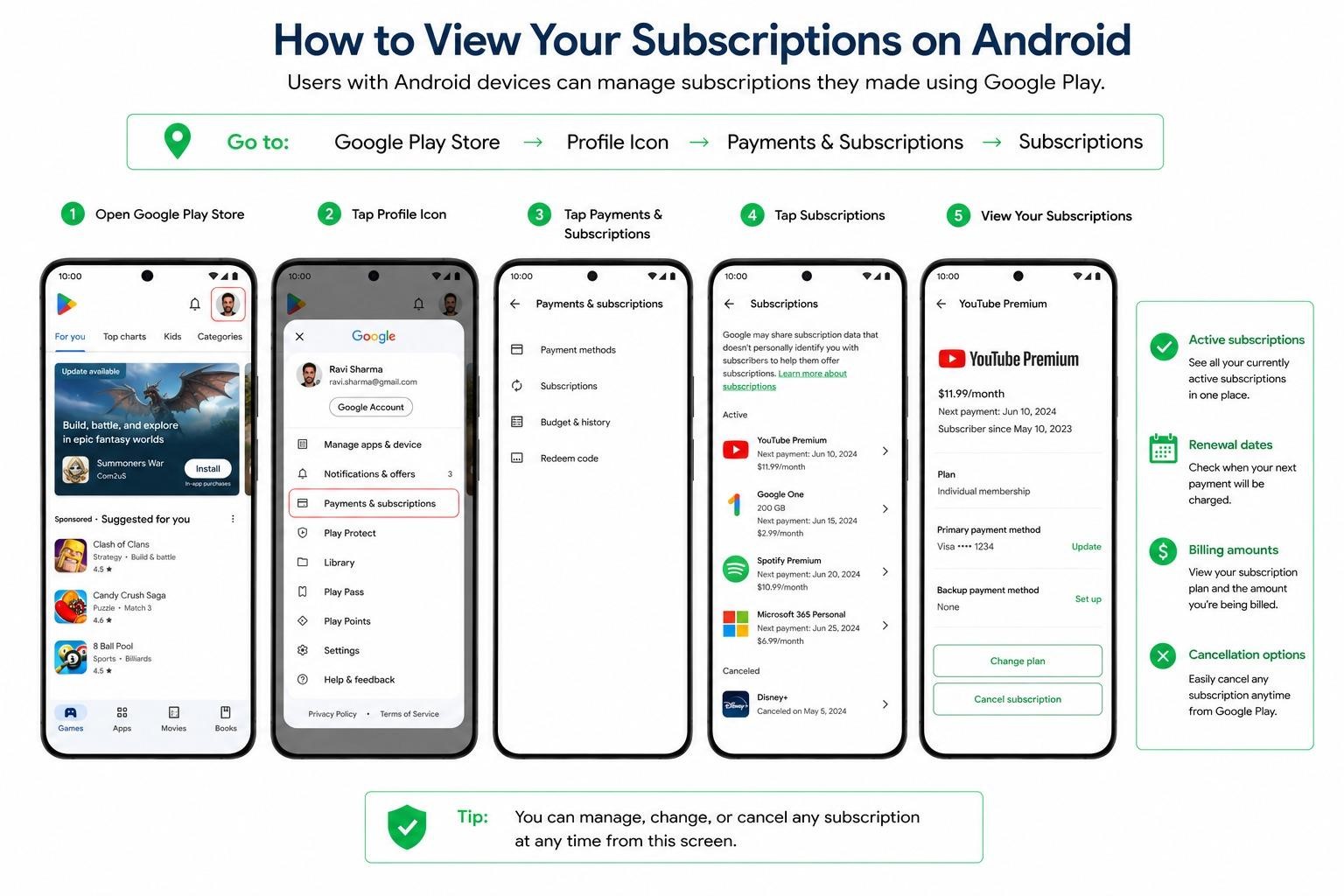
To view more details or to manage your plan, click on one of the subscriptions.
How to Identify Forgotten Auto-Renewals
All recurring charges do not show up in your Apple/Google subscription list.
To find additional subscriptions:
Check Your Bank or Credit Card Statements
Check out the activity from the past two or three months and find any recurring charges.
Common examples include:
- Streaming services
- News subscriptions
- Cloud storage plans
- Productivity software
- Fitness memberships
When your charges are the same each month, you probably have an auto-renewing subscription.
Search Your Email Inbox
Look up words like:
- Subscription
- Membership
- Renewal
- Payment Receipt
- Free Trial
Some of the old confirmation emails may help you find many forgotten subscriptions.
Before You Cancel a Subscription
However, if you cancel, make sure that you don’t have any files, photos, or data stored with the service.
Cloud storage services and productivity software, for instance, might have limited storage access after cancellation or only provide access to top features with a paid subscription.
Check the terms of the service for what will happen when the subscription is cancelled.
Make Subscription Reviews a Habit
The simplest way to avoid wasting money is to review your subscriptions once a month. Just take some time to review your Apple subscriptions, Google Play subscriptions, or recent bank activity.
While many individual subscriptions can be quite low cost, it can be easy for some services to creep up on you over time, so that you may not be using them. A regular monthly check-in routine can help keep you from paying for services you’re not using.